Welcome to Filently
Your AI-powered document assistant that keeps your storage organized for you.
Written By Valentin from Filently
Last updated 8 months ago
What is Filently?
Filently is an AI-powered filing layer that automatically organizes your documents in your cloud storage. Currently available for Google Drive, with Dropbox, OneDrive, and iCloud coming soon. Instead of manually renaming files and dragging them into folders, you simply upload a document and Filently takes care of the rest.
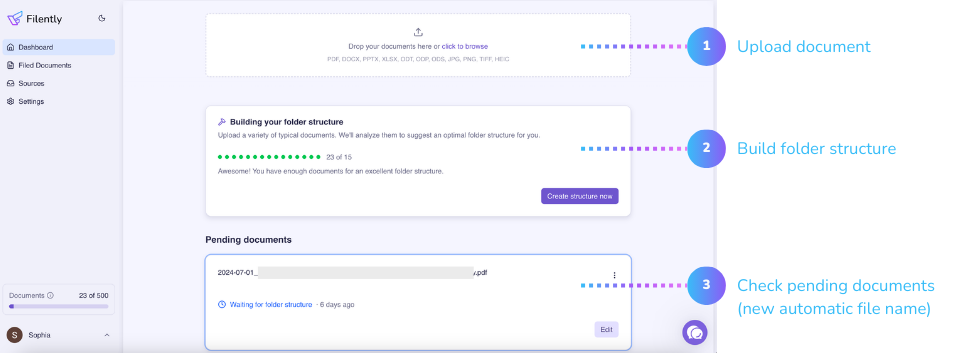
Here is how it works:
A document arrives – Upload files via drag & drop, or let Filently watch your Inbox folder in Google Drive for new documents automatically.
AI names it properly – Filently reads the document and generates a clear, descriptive filename (no more "scan001.pdf").
AI files it in the right folder – Based on the document's content, Filently moves it to the correct location in your existing folder structure – or creates a smart one for you if you don't have one yet.
You review or let it auto-file – When Filently is confident, it files automatically. When it is unsure, it asks you to confirm.
That is it. Your documents end up in the right place with the right name, without you having to think about it.
Key Features
Smart naming – AI reads your documents and generates descriptive filenames based on the actual content.
Automatic folder filing – Documents are sorted into the right folder within your Google Drive structure.
Inbox folder watching – Filently can watch a designated folder in your Drive and automatically process new files that appear there.
Customizable rules – Adjust how Filently names and files documents to match your preferences.
Your files, your Drive – Documents are stored directly in your Google Drive, not on Filently's servers.
What You Need
To get started with Filently, all you need is:
A Google account with Google Drive
A modern web browser (Chrome, Firefox, Safari, or Edge)
That is it. No software to install, no complicated setup.
Next Step
Ready to get started? The first step is connecting your Google Drive to Filently.
Still need help? Ask the team