Custom Filing Instructions
Give Filently's AI specific guidance on how you want your documents named and organized.
Written By Valentin from Filently
Last updated 22 days ago
What Are Custom Filing Instructions?
Custom filing instructions are a free-text field where you tell Filently exactly how you want certain types of documents handled. Think of it as giving your AI assistant a set of personal rules to follow.
You can find the instructions field under Settings > Filing > Custom Instructions. You have up to 5,000 characters to work with.
How They Work
When Filently processes a document, it feeds your custom instructions to the AI alongside the document's content and your folder structure. The AI treats your instructions as priority guidance when deciding:
What to name the document
Which folder to file it in
Your instructions apply to all documents processed after you save them. There is no need to repeat them for each upload – they are always active in the background.
What to Include
You can write your instructions in plain, natural language. The AI understands context, so there is no need for special syntax or formatting. Here are some categories of rules that work well.
Filing Rules
Tell Filently where specific types of documents should go:
"File all invoices in the Finance/Invoices folder"
"Insurance documents should go under Insurance, sorted by provider name"
"Separate personal and business tax documents into their respective folders"
"Bank statements go in Finance/Bank Statements"
"Anything from my landlord goes in Housing/Rental"
Naming Preferences
Specify how certain documents should be named:
"Always include the company name in invoice filenames"
"For contracts, use the format: Contract - Company Name - Subject"
"Include the invoice number in the filename when available"
"For medical documents, include the doctor's name"
"Receipts should include the amount in the filename"
Document-Specific Handling
Set up rules for particular document types you process regularly:
"Payslips should be filed under Employment/Payslips with the month and year"
"Utility bills go in Housing/Utilities, named by provider and month"
"Receipts over 100 EUR go in Finance/Major Purchases, others in Finance/Receipts"
"Tax assessments go in Finance/Tax/[Year]"
"School reports go in Family/[Child's Name]/School"
Language and Regional Preferences
If you work with documents in multiple languages, clarify how you want them handled:
"Use German folder names" or "Keep all filenames in English"
"Use DD.MM.YYYY date format for German documents"
"Translate document types to English in the filename, even if the document is in French"
"My folder names are in English, but some documents are in Spanish – always file using the English folder names"
Mentioning Folders with @
Instead of typing folder names manually, you can reference folders directly from your drive. Type @ anywhere in the instructions field and a search popup will appear. Start typing to filter, then select the folder you want.
The selected folder appears as a highlighted pill in your instructions. This creates a direct link to the folder in your drive, so the AI knows exactly which folder you mean — even if multiple folders share similar names or are nested in different locations.
You can mention as many folders as you need. For example, instead of writing "file invoices in Finance/Invoices", you can type "file invoices in @" and select the exact folder. This removes ambiguity and ensures your instructions always point to the right place.
The search initially loads your first 500 folders. If you have more folders and cannot find the one you are looking for, click "Can't find your folder? Load more…" at the bottom of the dropdown to load additional folders.
An Example in Practice
Here is what a complete set of instructions might look like for someone managing personal and household documents:
File invoices in Finance/Invoices, with the company name and invoice number in the filename. Bank statements go in Finance/Bank Statements. Utility bills go in Housing/Utilities, named by provider and billing month. Payslips should be filed under Employment/Payslips. Insurance documents go under Insurance, grouped by provider. For contracts, name them as "Contract - Company - Subject". Keep all filenames in English, even for German documents.
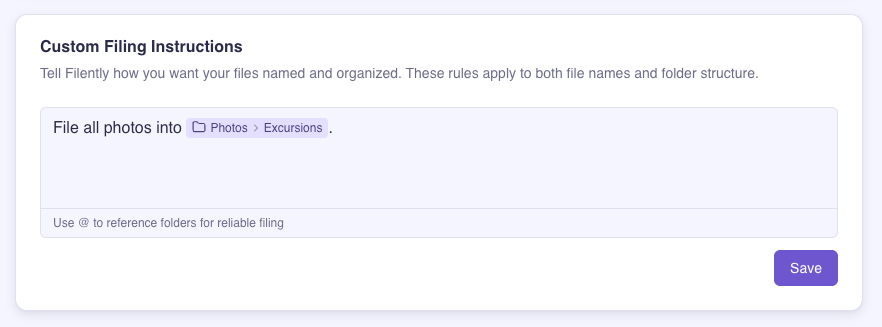
This gives the AI clear, specific guidance without being overly complex.
Tips for Effective Instructions
Be specific but concise. The AI understands natural language, so write your instructions the way you would explain them to a colleague. No need for overly technical phrasing.
Focus on what is non-obvious. You do not need to tell the AI to file an invoice in a folder called "Invoices" – it will likely do that on its own. Focus your instructions on rules the AI would not know without your input.
Mention exceptions. If you have edge cases, call them out explicitly: "File everything from Company X in the Projects/X folder, even if it looks like a regular invoice."
Reference your folders with @. Type @ to search and insert a folder directly from your drive. This is more reliable than typing folder names manually, especially for deeply nested or similarly named folders.
Start simple and iterate. Begin with a few core rules and see how the AI handles your documents. Add more instructions over time as you notice patterns that need correction.
Cover multilingual cases. If you process documents in multiple languages, be clear about how you want naming and filing to work for each.
Iterating and Improving
Custom instructions are meant to evolve with your workflow:
Process a batch of documents and review the results.
Spot patterns – If the AI consistently handles something in a way you would change, add a rule for that case.
Update your instructions at any time. Changes take effect on the next document processed.
Keep refining – The more specific your instructions, the more accurate the filing becomes.
Feedback
Have a use case that is not working well with custom instructions? We would love to hear about it – let us know on our feedback portal or directly via chat. Your input helps us improve the AI for everyone.
Related Articles
Still need help? Ask the team